Know your network
Around the clock
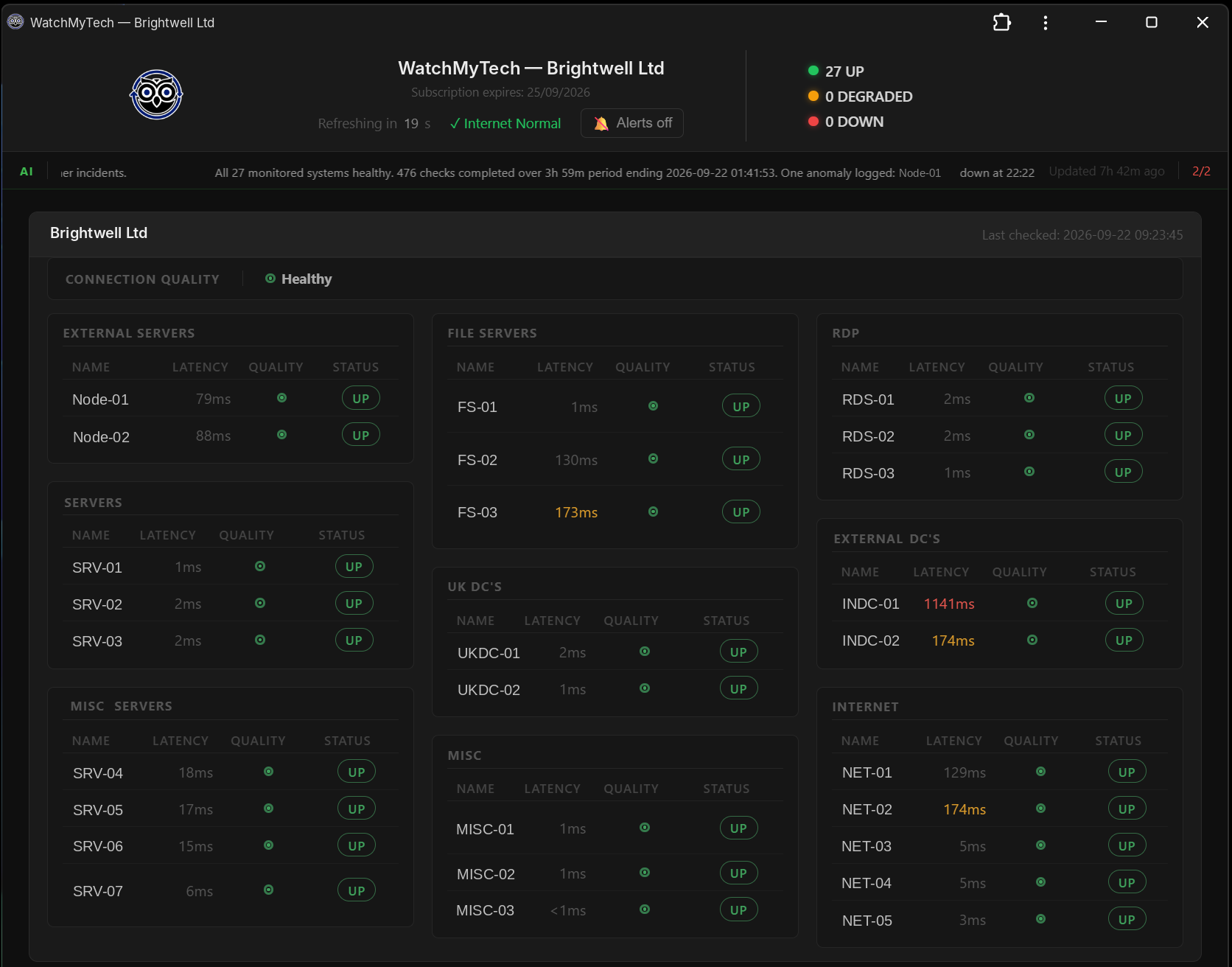
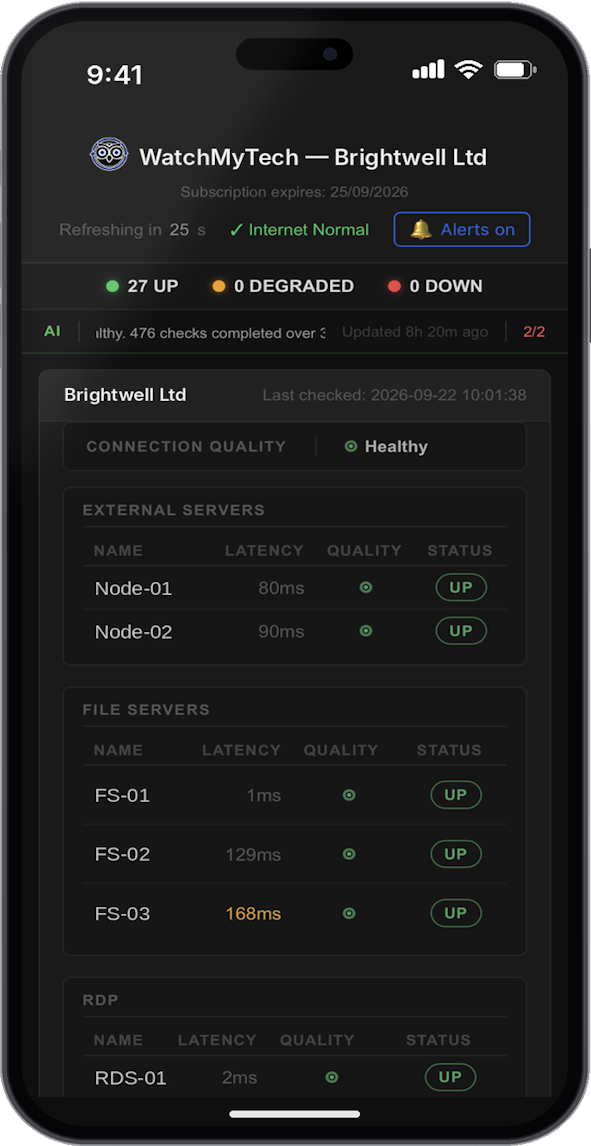
WatchMyTech watches the servers, printers, CCTV, internet connections and services that matter, and alerts your phone or Teams channel the moment one drops. Set up in minutes on any Windows PC or server, secure from the first click.
Don’t waste time and money hunting for faults — get ahead now!
- No SNMP, no agents — running in minutes
- Alerts by email, push or Teams
- Private by design — only status data leaves
- MSP-ready — every client, one phone
No credit card required · Windows 11 & Server 2019–2025 · UK-hosted data
Everything you need to
own your network
- Only status, latency, labels and sensor data leave your machine — never your traffic or credentialsOnly monitoring data leaves — never your traffic or credentials
- Every network monitored independently (MSP)
- A dedicated app per client (MSP)
- No shared logins (MSP)
- No mixed-up clients (MSP)
- A portal that only receives the data you choose to monitor
- Local-first monitoring
- Built for Windows
- Fast and clean
- Your network stays private
Instant Alerts
- Email, push or Teams channel alerts the moment a device goes down or your network changes
- Push arrives on your phone through the browser — no app store, no download
Spot Slow Devices
- Live latency on every device, so you catch the slow one dragging your network down
- Rising response times flag trouble before a device drops offline completely
AI Summary
- Get a summary of the last 4 hours whenever you log in
- See what's been happening while you were AFK
Out Of The Office
- Jump on your phone to see what's happening
- Passive, read-only monitoring behind 2FA
- Changes can only be made at the PC hosting WatchMyTech
Lightweight
- Can sit quietly in the system tray with minimal CPU and memory usage
- Or run as a Windows service
- You won't notice it until you need it
Device History
- A log of when devices you are monitoring went down, if they came back up and when
Security
- TOTP two-factor enforced at every layer - app, system login, and external portal
- Outbound-only — never your network traffic, IP addresses, or credentials. Learn more
Temperature Tracking
- Grab yourself a temperature sensor from SensorPush if you wish to monitor live temperatures and humidity data right within the app
- Get alerted about high temps too
AD User Tracking
- Any account enabled or disabled is alerted the moment it happens
- See exactly what your IT staff have activated or de-activated — and spot suspicious activity early
Service Monitoring
- Watch any service that listens on a port — SQL, CRM, ERP, web servers, mail, and your own line-of-business apps
- Get alerted the moment one stops responding, not just when the whole machine goes down
Simple, honest pricing
No hidden fees. Cancel anytime. Priced per site, with up to 30 devices on each.
- Up To 30 Devices
- Instant Alerts
- Response Times
- Out Of The Office
- Priority 📧 Support
- All Updates Included
- Access All Features
- Up To 30 Devices
- Instant Alerts
- Response Times
- AI Summary
- Out Of The Office
- Priority 📧 Support
- All Updates Included
- Access All Features
- Up To 30 Devices
- Instant Alerts
- Response Times
- AI Summary
- Out Of The Office
- Priority 📧 Support
- All Updates Included
When your 14-day trial finishes, your account automatically moves to the free plan, so the basics keep running at no cost. Alerts, response times, phone access and the AI summary need a paid plan, so upgrade any time to get them back.
- Up To 30 Devices Per Site
- Device Monitoring
- Service Monitoring
- AD User Tracking
- All Updates Included
No hidden complexity. No enterprise price tag. Just monitoring that works.
← Swipe to compare →
|
WatchMyTech
|
PRTG | SolarWinds | |
|---|---|---|---|
| Starting price | £50/mo per site 14-day Free Trial of Pro |
*$200/mo Billed Annually |
*$2,995+ Annual Subscription |
| No SNMP setup | ✓ | ✕ | ✕ |
| Windows native app | ✓ | ✓ | ✓ |
| Email, Push & Teams Channel — no app store | ✓ | * | * |
| Per-device response times | ✓ | ✓ | ✓ |
| Service / port monitoring | ✓ | ✓ | ✓ |
| AD user tracking | ✓ | * | ✓ |
| Temperature monitoring | ✓ ~ | ✓ ~ | * |
| AI summary on login | ✓ | ✕ | ✕ |
| Remote mobile portal | ✓ | ✓ | ✓ |
| 2FA throughout | ✓ | * | * |
| Setup time | Minutes | Hours–days | Days |
| Target user | SMB IT teams | Enterprise | Enterprise |
* = partial support or requires add-on · ~ = requires optional sensor · Pricing as of 2026
Frequently Asked Questions
- An up/down status and latency figure for each monitored device, plus the label you've given it
- Active Directory account-change events
- Any temperature sensor readings
- A 10-second heartbeat to confirm the app itself is alive
- Covers servers, workstations, printers and network hardware
- Also watches any service that listens on a port — SQL databases, CRM, ERP, web servers, mail and your own line-of-business apps
- Alerts you the moment a service stops responding, not just when a whole machine goes down
- Managing multiple clients? Install a separate instance per client — each independently monitors up to 30 devices on that client's network
- Normal Windows PC: install straight from the Microsoft Store (the WatchMyTech listing)
- Server or no Store access: run the PowerShell one-liner — it fetches the signed installer, verifies it's genuinely ours and opens the setup wizard
- Prefer to do it yourself: just download the signed installer and run it
- Email — set up in the setup wizard, or later from the Settings menu in the app.
- Push notifications — delivered to your phone or desktop through the WatchMyTech portal, which installs as a web app (PWA) with no app store download. Turn them on in the Dashboard.
- Microsoft Teams channel — create a webhook in Teams using Workflows, then paste the webhook URL into the Dashboard. Alerts are then posted straight into the channel.
- Local-first — it runs on your own machine and never sees the contents of your network traffic, your IP addresses or your credentials.
- Two-factor everywhere — every sensitive action is protected by TOTP two-factor authentication.
- Outbound-only — no inbound listener and no remote commands, so it can't be used as a route into your network.
- Encrypted in transit — all telemetry is sent over HTTPS.
For the full detail — exactly what leaves your machine, where it's stored and for how long — see our Security & Privacy page.
Why choose WatchMyTech?
Know before your users do
- Is it you or the internet? WatchMyTech checks both, so you know straight away whether it’s your network or your provider.
- Alerts the moment something critical drops. Email, push notification or straight into a Microsoft Teams channel, so the whole team sees it without checking anything manually.
- Catch a slow decline before it's an outage. Connection quality tracking flags a struggling device before it fails outright.
- Protect server rooms and comms cabinets. Live temperature alerts warn you before heat damages equipment.
Alerts you can trust
- Never blindsided by silent monitoring. A "dead man's switch" notices if WatchMyTech itself stops reporting and alerts you anyway.
- No false "it's down!" alarms. Real service checks (not just ping) and update-aware grace periods mean a VPN quirk or routine Windows reboot won't wake you for nothing.
- Doesn't clock off when you do. Runs as a background service around the clock.
- Know exactly what happened, and when. Device history logs when each device went down and when it came back, so you have the facts rather than guesswork.
Secure, private, MSP-ready
- Spot suspicious Active Directory activity early. A burst of new user accounts — say, from a compromised admin login — gets flagged instead of discovered weeks later.
- Your dashboard stays private. Password plus two-factor login, never an open link.
- Multiple clients, nothing mixed up. Each company gets its own separate dashboard and alerts.
- Check status from anywhere. The dashboard installs on your phone like an app, so you're not tied to your desk.
Useful from day one
- Monitor exactly what matters. You choose the devices and ports to watch — SQL, mail, web servers or your own apps — so your dashboard isn't cluttered with things you don't care about.
- Plain English, not a wall of graphs. AI turns raw monitoring data into one readable sentence.
- No network-engineer degree required. Sensible defaults mean it works well straight out of the box.
- Try it free before you commit. Prove the value before paying for it.
Meet the night owl
Watch our short video showing our great features. Press play with the sound on.